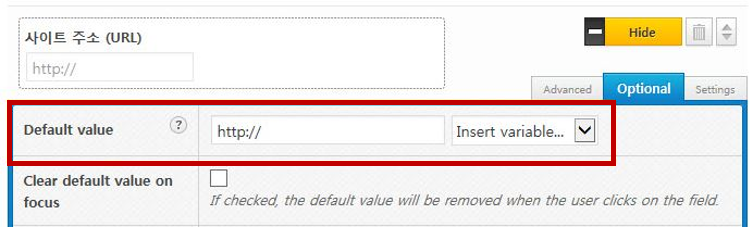
워드프레스의 컨택트 폼 플러그에서 필드의 값을 미리 채울 수 있습니다.
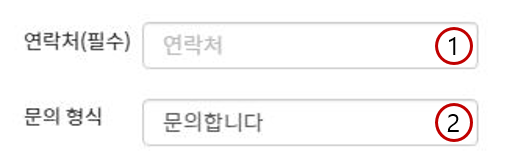
1은 입력란에 값을 입력하면 미리 채워진 글자가 없어지고 새로 입력한 내용이 노출됩니다. 2는 필드 값 자체가 입력되어 있어 새로운 내용을 입력하기 위해선 필드에 입력된 내용을 삭제하고 새로운 내용을 입력해야 합니다.
많이 사용하는 플러그인 2가지에서 필드 미리 채우기를 정리해 보았습니다.
Contact Form 7 플러그인에서 필드 미리 채우기
<p>연락처 (필수)<br />
[tel* tel-268 placeholder “연락처”] </p>
<p>문의형식<br />
[text your-subject “문의합니다“] </p>
위와 같이 [placeholder “연락처”] 형식으로 입력하면 값이 미리 채워지지만 이 값은 필드 값이 아닌 Placeholder 속성으로 채워집니다.
필드 값을 미리 채우려면 [placeholder] 없이 [text your-subject “문의입니다“]와 같은 형식으로 입력하면 됩니다.
Quform 플러그인에서 필드 미리 채우기
Quform에서 각 필드의 setting을 통해 값을 미리 채울 수 있습니다.
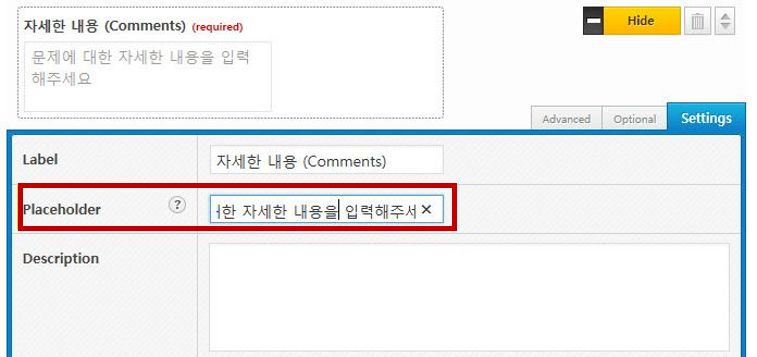
Placeholder 속성을 지정하려면 [Setting]에서 Placeholder 옵션에 원하는 내용을 입력하면 됩니다.
필드 값을 미리 지정하려면 Optional 탭을 눌러 Default value에 원하는 값을 입력하면 됩니다.