Imagify 플러그인 세팅

Imagify 플러그인 세팅

Imagify 플러그인 세팅

imagify_매뉴얼_02

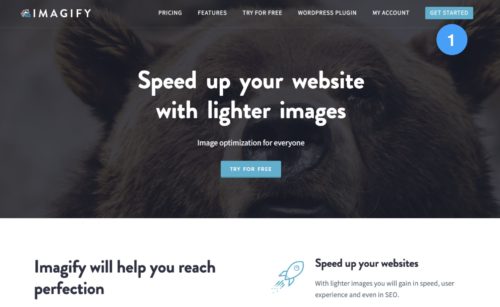
1

https://imagify.io/ 접속 후 계정 만들기(무료)

imagify_매뉴얼_03

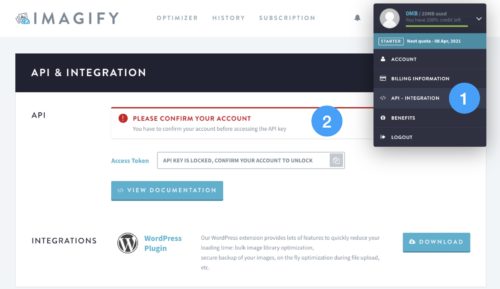
1

로그인 후 [API - INTEGRATION] 클릭

2

메일 계정 확인 - 가입한 메일 접속 후 imagify에서 발송한 메일로 계정 확인

imagify_매뉴얼_04

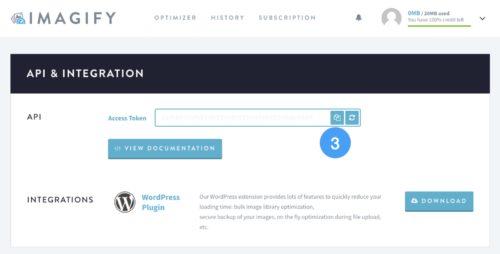
3

API 복사 - Access Token 복사 아이콘 클릭

imagify_매뉴얼_05
imagify_매뉴얼_08

1

관리자화면 로그인 후 [플러그인] 클릭

2

설치된 플러그인 중 [Imagify > Settings] 클릭

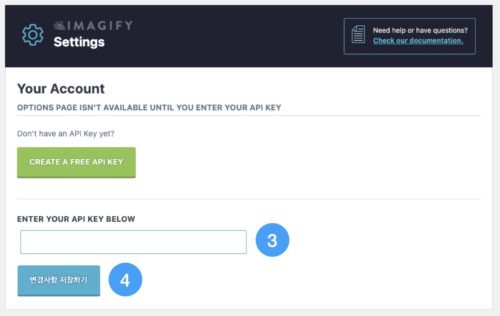
3

해당 영역에 복사한 API 입력

4

[변경사항 저장하기] 클릭 시 완료

We value your privacy

We use cookies to make this website work and, with your permission, to understand how it is used and to measure our advertising. Necessary cookies are always on. Analytics and marketing cookies stay off unless you choose “Accept all” or switch them on under “Customize”. You can change your choice at any time from “Cookie settings” at the bottom of the page. Read our Privacy Policy.
Strictly necessaryNeeded for the site to work: security, your language choice and remembering your cookie settings. These cannot be switched off.
Always active